
Lead: Playing Your Part As Your Child Starts Being Online

Digital independence grows with time, guidance, patience and practice. Children and their caregivers move back and forth between protecting, leading, coaching and supporting - depending on the platform, the challenge, and confidence and experience levels.
Lead
Keep reading to explore what digital guardianship could look like as tamariki start to take more notice of the online world and how you can guide them to make safe online choices.

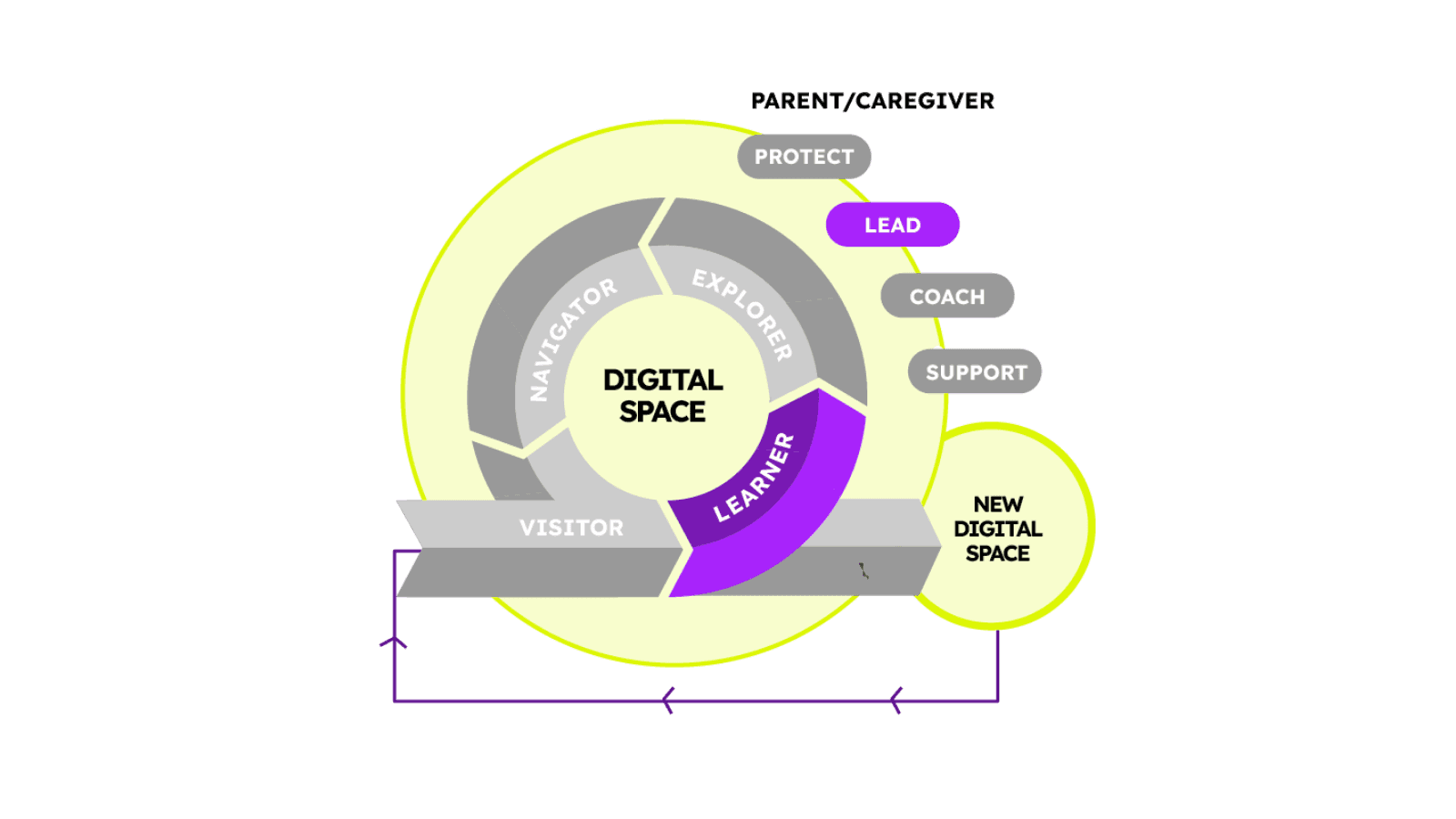
As your child's online experiences evolve, so too does your approach to protecting and supporting them.
Where are you?
Guardian: You are a leader and a role-model by default, as your tamariki quietly observes online use and digital habits within the whānau. The focus here is on showing your tamariki what it looks like to have well balanced, safe and responsible online experiences, and staying connected to build their confidence through conversation and collaboration.
Tamariki: Your tamariki is a learner online, extending their online experiences and showing more interest in the content they consume and the spaces they visit.
Your child is growing in confidence and they may want to choose their own shows to watch, start playing simple online games, or using the internet for schoolwork. They’re curious, independent, and eager to explore, but still rely on you to help set boundaries and model safe, kind, and balanced habits.
Digital guardianship here is about leading by example, showing them how to make good choices, talking about what they find, and helping them to stay balanced.
You’re still setting limits, but as your child becomes more confident try involving them in agreeing some of the expectations and boundaries. This helps them internalise safe habits rather than relying solely on external rules.
Choosing media and games together is an opportunity to start talking about what makes some content higher quality, more engaging and more suitable (for example episodes of a series versus reels and shorts, or content that involves creativity, movement and education).
CORE HABIT
Pause, Check, Tell
This habit builds thinking skills by helping tamariki to slow down, question what they see, and to stay connected through kōrero.
How to explain it:
"Before you click, post, or reply online..."
Pause and take a moment to check if you are in one of your safe apps or games
Check if it's OK, check if it feels right, and check with an adult if you're unsure
Tell me or another person you trust if you made a mistake, saw something upsetting, or if something online didn't feel right
Top tips for whānau:
- Model pausing before you post or click (“I’m just checking this site first”)
- Introduce critical thinking questions (“Who made this? Why?”)
- Encourage tamariki to talk about what they enjoy online to normalise the conversation
What to know
Common online experiences include playing online games, streaming videos, using devices for schoolwork, video calls, and discovering new apps and trends.
Opportunities:
- Learn creativity, collaboration, and problem-solving
- Build friendships and confidence through shared online experiences
- Strengthen digital literacy and curiosity about the world
- Practise empathy and respectful communication
Risks and challenges:
- Exposure to inappropriate or confusing content
- Pressure to fit in (“everyone’s playing it!”)
- In-game chat or ads leading to unwanted contact
- Struggles to balance time online and offline
- Early risk of oversharing personal information
Remember this...
Balance isn’t about perfect limits - it’s about realistic rhythms that fit your whānau life.
Ways to engage
- Play and learn together
- Let them show you their favourite games or apps. Ask what they enjoy, what frustrates them, and how it makes them feel.
- Use the kōrero cards in the toolkit
- Pick a question every week to explore with your tamariki to connect about their online experiences
- Watch Hector’s World together
- Introduce online safety topics such as digital footprints and privacy with these animated episodes and parent guides
- Complete the 'My Trusted Team' activity
- Talk about the trusted people that your tamariki could turn to if they needed help or advice about being online
- Learn together and learn from them
- Let tamariki teach you about an app they use or how to play their favourite online game
- Search and navigate online together
- Find the teachable moments (for example spotting ads or sponsored content) when looking for an answer to a question together or searching for a picture to print out
- Talk about your mistakes
- Admit when you make a mistake or overlook a house-rule and talk about it together
- Recognise positive behaviours and respect for boundaries
- Use the Visitor certificate templates
- Discuss and display the Learner Fridge Template
- Chat about the core habit and talk about why it's important to stay safe online
Involve the whānau
Digital life becomes more social here — wider circles of influence begin to shape habits.
Siblings
Encourage older tamariki to model good digital habits — younger ones copy what they see.
Grandparents / extended whānau
Share your family’s expectations around games, privacy, and screen time. Get together and build a digital whānau plan to keep a reminder of what okay and not okay, and what to do if something goes wrong.
School whānau
Keep in touch with teachers about what’s being used in class; support the same habits at home.
Shared homes: Align controls and rules where possible — consistency builds confidence.

Top 5 Tips
1. Keep using controls
Parental controls, privacy and security settings are still important - and so is explaining why. If you allow access to a new game or app, check out the age rating and what settings you can customise (for example messaging permissions, location settings, blocking and reporting controls) and talk about what should be in place to keep them safe. Reviewing this together helps to build understanding and ownership.
2. Co-create a family agreement
Discuss the whānau expectations around tech use and find opportunities for your child to be involved in the decision making around what's OK and what's not. This is a great way to get their buy-in and to start practicing shared responsibility and reflection around tech use.
3. Model balance
Your tamariki will mirror your habits and behaviours. Be deliberate in showing them what balanced, respectful, and safe digital use looks like and talk aloud about the choices you’re making. Call yourself out if you catch yourself mindlessly scrolling, be deliberate about putting your phone away during family time or at meals and show them how you pause and check before clicking or sharing something online. Now is a great time to demonstrate asking for permission before sharing images or videos online, especially if it features them.
4. Talk about ads and content
Help them spot ads and sponsored posts, and reflect on what content feels fun, engaging and uplifting. Co-decide what content is okay and try creating a simple checklist together for what makes a good app or show (e.g. is it fun / kind / feels safe / not many ads)
5. Celebrate good choices and talk about mistakes
Praise reflection and self-control, not just rule-following. When you make a mistake online or spend longer on your phone than intended, talk about it “I clicked a link I shouldn’t have - here’s how I fixed it.” This shows your child that learning to manage tech is an ongoing process for everyone.
What's next?
As your child builds their confidence in the online spaces you approved and set up, they may start to want more independence.
This might include wanting to explore social platforms, online communities, and games that connect them with others. As their online experience evolves, you might shift into the next phase of guardianship to coach them, guide reflection, and problem-solve together.
You might still lead in some areas while coaching in others - it’s all part of the flow.
These indicators aren’t milestones - they’re patterns of readiness. Children move forward and back depending on the app, their confidence, and what’s happening in life. Use these signs as conversation prompts, not assessments - to guide where your whānau puts focus next.
- They can start to evaluate media independently, for example “that ad was weird” or “this one’s for older kids”)
- They show empathy, for example recognising hurtful behaviour in a video, and relate your whānau values to what they’re watching and seeing online
- They can pause before reacting - showing some self-regulation when frustrated or disappointed online, or when screen time comes to an end
- They understand basic privacy concepts and explain why personal information needs to be kept safe online
- They can explain household rules to others and suggest their own
When your tamariki can apply safe and balanced habits without constant reminders, they’re ready to start practising critical thinking and reflection with your guidance - the Coach stage.
Digital parenting is a shared journey, not a checklist. Each conversation you have - each curious question - builds the trust your child needs to explore safely. You’re not just teaching digital skills; you’re teaching self-awareness, kindness, and confidence, and you’ve got this.
Each phase of your digital guardian journey (Protect, Lead, Coach, Support) is connected. Caregivers and whānau will move between stages often depending on context, confidence, and new experiences.
What matters most isn’t which level you’re in, but how you stay connected, curious, and kind along the way.
Contact Netsafe
If you or a child in your care experiences online harm or needs advice, Netsafe is here to help.
Contact us for free, confidential, and non-judgmental advice and support.
